Not Receiving University Emails? Set Up Auto-Forwarding
● Campus Webmail(t[Student_ID]@ntut.edu.tw): The default address used by all official university systems (e.g., Course Add/Drop, Office of Student Affairs). Access via the school's Webmail platform.
● Student Gmail(t[Student_ID]@ntut.org.tw): Google Workspace educational account. Official campus notifications are NOT automatically sent here.
Action Required: If you do not regularly check your Campus Webmail, please set up "Auto-Forwarding" immediately to avoid missing critical updates!
How to Set Up Auto-Forwarding
-
Log In: Go to Taipei Tech Portal > Information Services > Click [Web Mail].
-
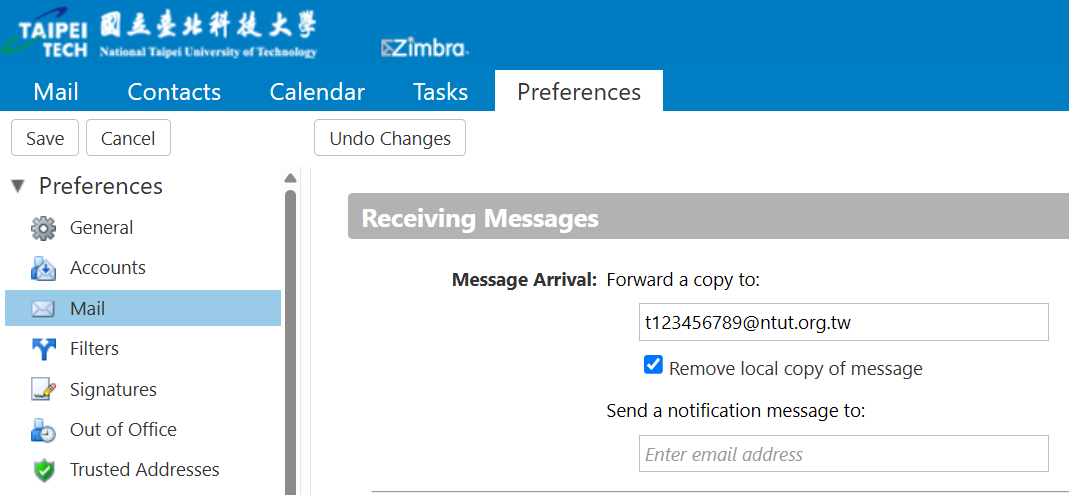
Navigate: Click the 「Preferences」 tab at the top, then select 「Mail」 on the left menu.
-
Configure: Under 「Receiving Messages」, find the field "Message Arrival: Forward a copy to:".
-
Save: Enter your frequently used email address, and click 「Save」 in the top-left corner.
🛠️ How to Prevent University Emails from Going to Spam
-
Open Gmail on your computer.
-
Click the Settings (gear icon) in the top right, then select See all settings.
-
Go to the Filters and Blocked Addresses tab.
-
Click Create a new filter.
-
In the From field, enter the university domain:
@ntut.edu.tw,@ntut.edu.tw -
Click Create filter (next to the Search button).
-
Check the box for "Never send it to Spam".
-
Click Create filter to save.
💡 Quick Tip: You can also add your advisors' email addresses and the department office's email directly to your Google Contacts. This will further guarantee that their messages land safely in your primary inbox.
● If you have completed all the settings above but still cannot receive Gmail messages on your iPhone or other iOS devices, please manually update the Gmail app first and refer to Google’s latest official troubleshooting guide: